How to show several families on one family tree
Some family trees are really several families: both sides of a marriage, a blended family, the rival houses of a fantasy world or the families of a long-running soap. PeoplePlotr can show them all on one chart. You write each family's story under its own heading, and the tree joins them up wherever they marry, with each family's name above it.
Meet the Five Houses
Our example is an invented fantasy world with five families:
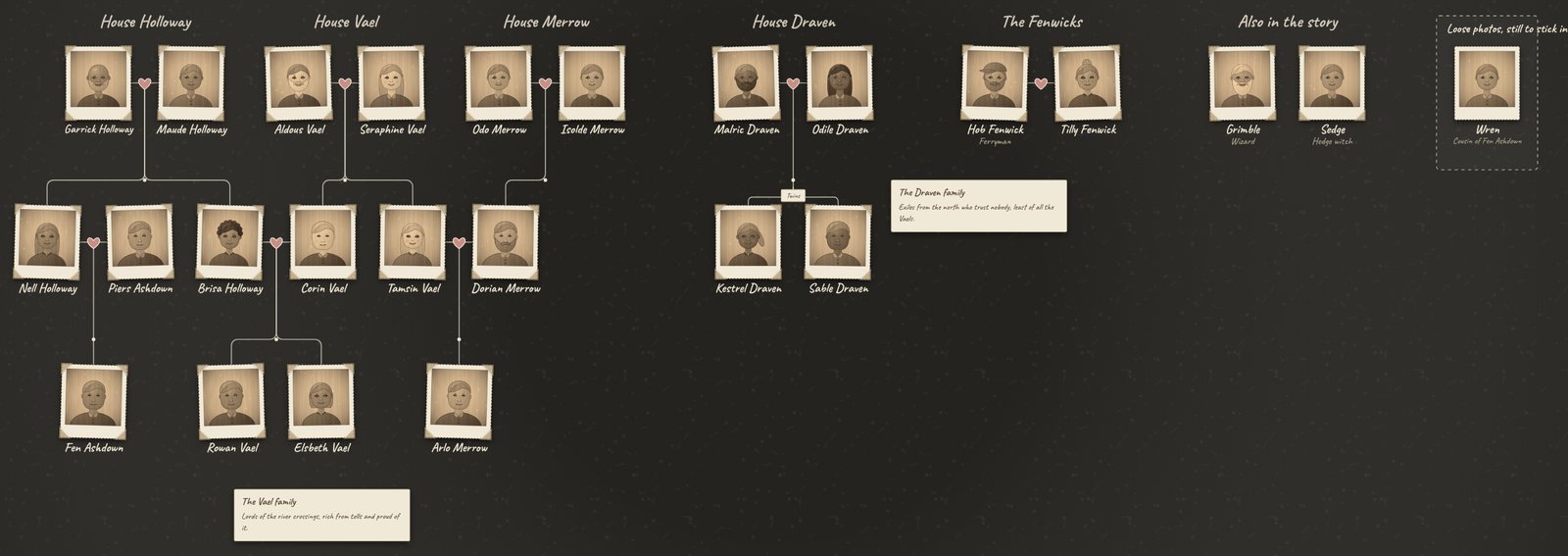
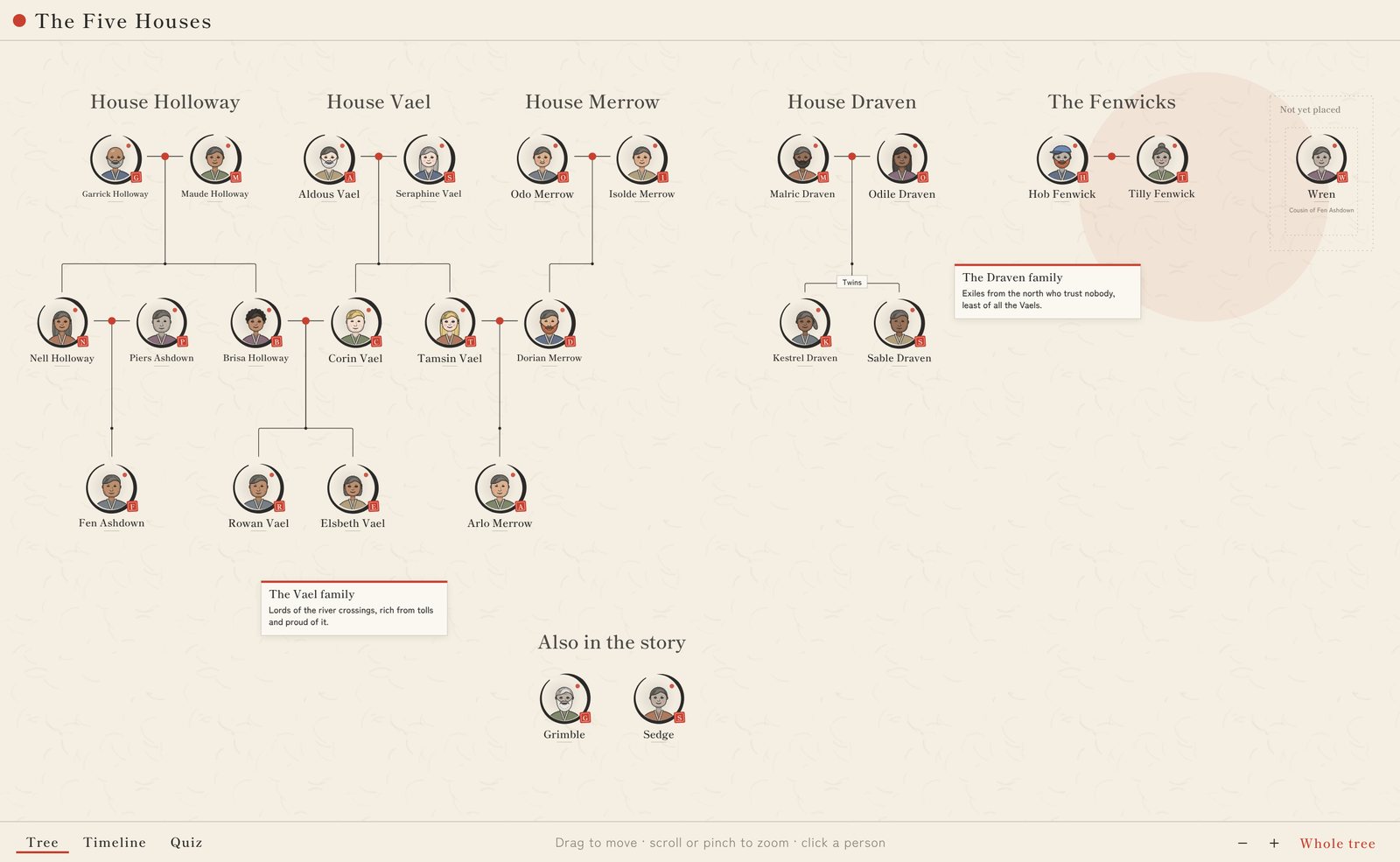
- House Vael, House Holloway and House Merrow are joined by two marriages: Corin Vael married Brisa Holloway, and his sister Tamsin married Dorian Merrow. They make one connected tree, with each house named above its oldest couple.
- House Draven and the Fenwicks aren't related to anyone else, so they stand on their own beside the others, each with its own name.
- Grimble the wizard and Sedge the hedge witch have no family at all. They appear under "Also in the story".
- Wren is Fen Ashdown's cousin, but the story doesn't yet say whose child she is. She waits to one side until it does.
Step 1: Give each family a heading
Start each family's part of the story with a heading line, like this:
Family: House Merrow
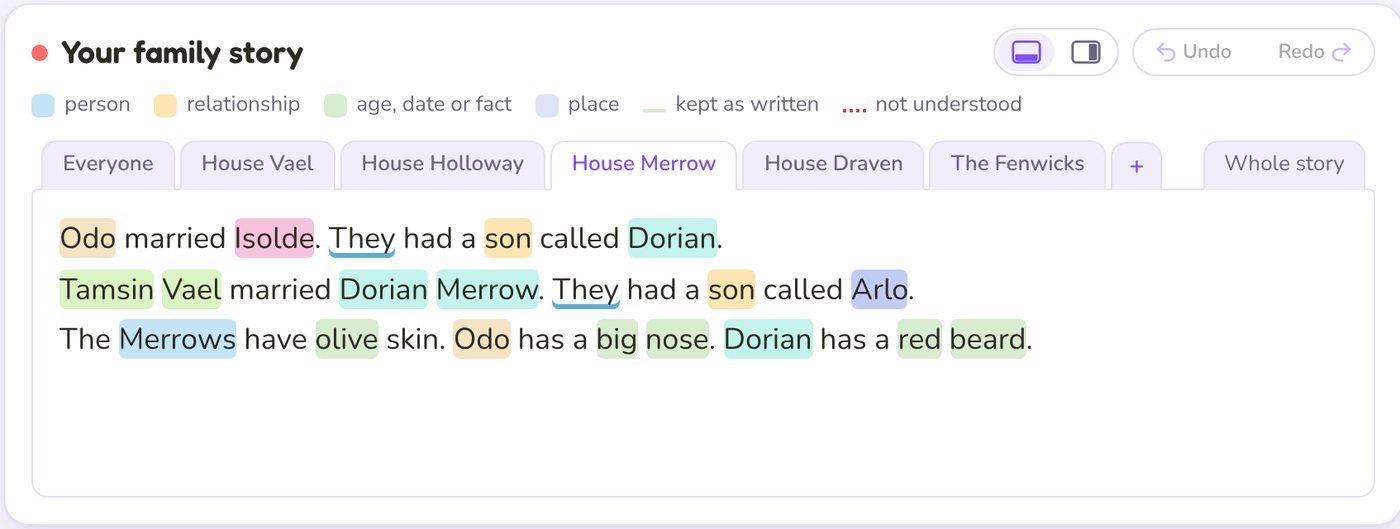
Odo married Isolde. They had a son called Dorian. Tamsin Vael married Dorian Merrow. They had a son called Arlo.
Each heading becomes a tab above the story box, so you can work on one family at a time. Click + to add a family, double-click a tab to rename it, and use Whole story to see everything together. It's still one story underneath, so saving and sharing work just as before.
Step 2: Use first names inside a family, full names across families
Under a family's heading, first names belong to that family and take its surname. "Odo" under House Merrow is Odo Merrow, and "Brisa" under House Holloway is Brisa Holloway, even if another family has an Odo or a Brisa of its own.
To link two families, use full names: Corin Vael married Brisa Holloway.
That one sentence joins House Vael and House Holloway into one tree. A surname the story gives always wins, so They had a son called Fen Ashdown
keeps Fen's father's name, even under the Holloway heading.
Step 3: Choose how the families sit
Families that aren't related sit side by side, or in a grid when there are lots of them. You can choose:
- In Settings, Families on the tree: Automatic, One row or Grid.
- Or write it in the story:
Put the families in one row
,Put the families in a grid
orPut the biggest families first
.
Step 4: Add the characters who don't fit
Every story has people outside the families. Mention them before the first heading, and they'll gather under "Also in the story":
Grimble is a wizard. Sedge is a hedge witch. Wren is Fen Ashdown's cousin.
Grimble and Sedge have no relatives, so they appear in "Also in the story". Wren is different. She's a cousin, but nobody has said who her parents are, so she waits to one side until the story places her. A sentence like Wren is Brisa Holloway's daughter
would move her into the tree.
Step 5: Give each family its own look and history
A sentence about a whole family changes everyone in it. The Dravens have dark skin
and The Vaels are fair-skinned
set each family's skin tone, without anyone marrying in taking it on. A note about a family shows on the tree as a small card beside them:
About the Draven family: Exiles from the north who trust nobody, least of all the Vaels.
What you can use it for
- Both sides of your family. Put your mum's family and your dad's family under their own headings, and the tree joins them at your parents' marriage.
- Blended families and in-laws. Show a step-family or your partner's family next to your own.
- Fantasy and fiction. Noble houses, rival clans and the families of a saga. See our character family tree maker guide for more tips for writers.
- History. Royal houses marry into each other all the time. Our Tudor family tree follows the Tudors into the Stuarts.
- School projects. A class can build the families from a book they're reading, one family per pupil or group.
Several families: quick answers
Can I combine two family trees into one?
Yes. Put each family under its own heading in one story, and link them with a sentence like Corin Vael married Brisa Holloway
. The two trees join up at that marriage.
What if two families have people with the same first name?
That's fine. A first name under a heading belongs to that family. Use the full name when you mean someone from another family.
How many people can I add?
A free account makes one tree with up to 25 people, exactly the size of the Five Houses. Premium accounts can make bigger trees for whole worlds, and use designs like Ancient, Vintage and Zen.